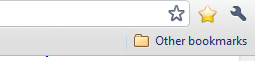
By default, the only bookmarks button on the Google Chrome toolbar is a small star at the end of address bar, which allows you to add a new bookmark or favorite. There are two methods for viewing and managing your existing bookmarks.
Each method only takes a few seconds to set up and is perfect for those who do not want to open the Google Chrome settings menu each time they want to view their bookmarks.

Each method only takes a few seconds to set up and is perfect for those who do not want to open the Google Chrome settings menu each time they want to view their bookmarks.
Keyboard Shortcuts
The easiest method uses two keyboard shortcuts. If you do not see a bookmarks bar under your address bar, press Ctrl + Shift + B to view your bookmarks bar.