Showing posts with label File. Show all posts

Show File Extensions in Windows

If you have just installed Windows on your computer, you may have noticed that you don’t see extensions on filenames. They are not visible by default. This post shows you how to show the extensions on filenames in Windows XP, Windows Vista, and Windows 7. This may seem like a simple task, but some of you may have forgotten where the setting is. You may be able to tell the type of file from the icon on the file, but it is not always obvious. For example, we have two copies of the JobAid file, but one is a Word 2003 (.doc) file and one is a Word 2007/2010 (.docx) file. By just looking at the files, you can’t easily tell the difference. However, you can easily show the file extensions to find out which file is which.

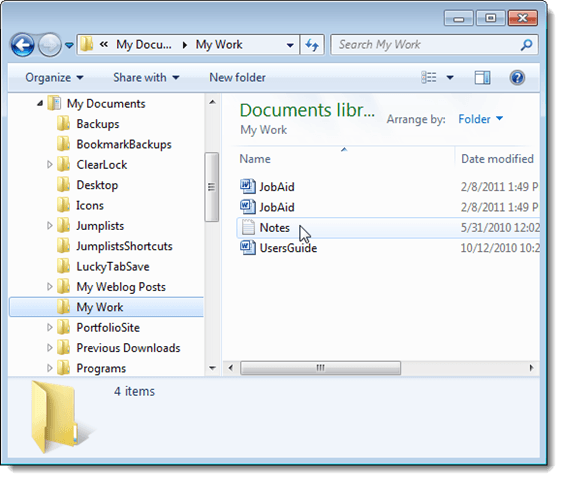
Filenames with no file extensions showing

Automatically Unselect the File Extension While Renaming any File in Windows XP

Do you often rename files in Windows XP, without changing the file extensions? If so, you probably find it very annoying that the entire file name, including the extension, is automatically highlighted when you press F2 with the file selected in Windows Explorer.
If you have renamed files in Windows 7, you will have noticed that the filename is highlighted but the extension is not. This allows you to more quickly and easily change the filename or copy it.

We found a small, free, portable tool, called TheEnd, that allows you to do something similar in Windows XP. When TheEnd is running, the whole filename is unselected when renaming a file and the cursor is automatically placed at the end of the filename before the dot and the extension.
Download TheEnd from
http://www.donationcoder.com/Software/Skrommel/.
TheEnd does not need to be installed. Simply double-click the .exe file you downloaded.