So, to start, the first thing you need to do is make the Developer tab visible on your main ribbon; to do that, click on the File option, then move down and select Options
Showing posts with label office. Show all posts
How to Create Fillable Forms in Word 2010
Not many people know that Microsoft has given Word users a way to create fillable forms for several iterations. In 2010, it all happens under a normally hidden tab, called Developer.
So, to start, the first thing you need to do is make the Developer tab visible on your main ribbon; to do that, click on the File option, then move down and select Options

Narrate PowerPoint Presentations with a Web Cam Video
PowerPoint presentations both bore and entertain students and business professionals throughout the world. As the Web has become more social, making these presentations accessible and effective for an online audience has proven challenging.
Narration is one way PowerPoint presentations become more effective in an online environment, but according to Present.me, if a narrator is not visible, only 65% of the presentation’s message is received. Present.me has created a solution for this problem.

Instead of just adding narration to PowerPoint videos, Present.me splits the screen to show the presentation on the left side of the window, and the narrator on the right.
Narration is one way PowerPoint presentations become more effective in an online environment, but according to Present.me, if a narrator is not visible, only 65% of the presentation’s message is received. Present.me has created a solution for this problem.
Instead of just adding narration to PowerPoint videos, Present.me splits the screen to show the presentation on the left side of the window, and the narrator on the right.
How to Use the Paragraph Features Section in Microsoft Word 2010
Many people that use Microsoft Word on a regular basis assume they know everything there is to know about formatting paragraphs, but there is one area, where many may not, and it all falls under the Paragraph section on the main ribbon in Word 2010:

Most people know about the bulleting and centering options on the left side of this section, so we’ll concentrate on those on the right; first up are the indenting icons

Most people know about the bulleting and centering options on the left side of this section, so we’ll concentrate on those on the right; first up are the indenting icons
How to Use Live External Web Data in Excel 2010
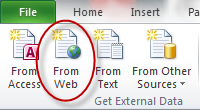
Oftentimes, users of Excel find they’d like to be able to import data from an external source such as a web page, this is particularly true of web sites that list stock information. What many people don’t know is that Excel does have a facility for doing just this.
To see how it works, open Excel to a new blank document, then click somewhere in your sheet to make it your current document, then click on the Data tab on the main ribbon

To see how it works, open Excel to a new blank document, then click somewhere in your sheet to make it your current document, then click on the Data tab on the main ribbon
Customize OpenOffice/LibreOffice Toolbars to Save Space
OpenOffice (and LibreOffice, which is actually the program shown in the screenshots), is a powerful office suite, available for Mac, Windows and Linux. It comes with different applications, which help with a variety of tasks.
It comes with a word processor, spreadsheet, presentation creator, database, drawing program and equation editor. Each is its own separate program, although they each share a fairly similar interface.
And that interface can be a bit messy. Take, for example, Writer, the word processing program. Here is what the toolbars look like, by default:

It comes with a word processor, spreadsheet, presentation creator, database, drawing program and equation editor. Each is its own separate program, although they each share a fairly similar interface.
And that interface can be a bit messy. Take, for example, Writer, the word processing program. Here is what the toolbars look like, by default:
Subscribe to:
Posts (Atom)