To use Audacity, you first have to download it from their web site, and install it onto your computer.
Next, make sure your audio recording is on your computer and in a place where you can find it.
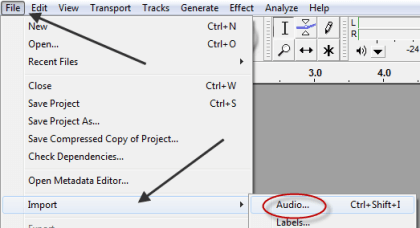
Then, fire up Audacity and load your recording by choosing File from the main menu, then selecting Import, then Audio…

Next, make sure your audio recording is on your computer and in a place where you can find it.
Then, fire up Audacity and load your recording by choosing File from the main menu, then selecting Import, then Audio…