Showing posts with label Excel. Show all posts
Manually Format Spreadsheets in Excel 2010
One the downsides to having all kinds of templates and style sheets in MS Excel is that you pretty much get locked in to creating sheets that look like everyone else’s; which doesn’t do much for creativity or inspirational ideas. This is why it’s a good idea to learn how to use Excels formatting tools.
To begin, start by creating a table that has some rows and tables, like this:

Then, highlight the whole thing…

Next, click on it with your right mouse button, to get this popup men:
To begin, start by creating a table that has some rows and tables, like this:
Then, highlight the whole thing…
Next, click on it with your right mouse button, to get this popup men:
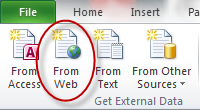
How to Use Live External Web Data in Excel 2010
Oftentimes, users of Excel find they’d like to be able to import data from an external source such as a web page, this is particularly true of web sites that list stock information. What many people don’t know is that Excel does have a facility for doing just this.
To see how it works, open Excel to a new blank document, then click somewhere in your sheet to make it your current document, then click on the Data tab on the main ribbon

To see how it works, open Excel to a new blank document, then click somewhere in your sheet to make it your current document, then click on the Data tab on the main ribbon
Subscribe to:
Posts (Atom)