
Zip-Lock is a small piece of software designed especially for encrypting Zip files. According to its maker, Electrons Under Control, without a password the Zip file is nothing but a jumbled mess.

Download Zip-Lock’s zip file and extract the files. Double-click the Zip-lock.exe file to start the software.

Enter a password for your zip file. Passwords can be as simple or as complex as you like, but must remain between 5 and 256 characters. Passwords are case sensitive, so be sure the password is something you will remember.

Above the password entry box, a button appears that says Select File to Lock or Unlock. Click the button to select your zip file.

In just a few seconds, your file is encrypted and a message appears stating your file has been locked.

Notice the name of your zip file has changed—it now has an added extension: ZLB.
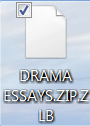
To open the file, you will need to use Zip-Lock again. After opening the software, enter your password—just like you did when you created it. When the Select File to Lock or Unlock button appears, choose the ZLB file. Instantly, the file is converted back to standard Zip format and unlocked.

While an extra layer of protection is always welcome, no password or encryption is 100% foolproof. That said, Zip-Lock’s protection is definitely superior to standard password protection.

No comments:
Post a Comment